x
 Welcome to the Intellark's mini-intro-panel
 أهلاً وسهلاً في ساحة-التعريف-المبسطة لانتلارك
|
x
Help
Intellark
👋👋👋 جربوا أعناب🍇، الباحث عن كلمات القرآن الكريم بدقة وسرعة فائقتين. هنا ڤيديو من 6 دقائق للتعرف عليها، وهنا ڤيديو مفصل من 30 دقيقة، وهنا التطبيق. 👋👋👋 Try Anab 🍇, the Quran words retriever with amazing accuracy and speed. Here is an introductory 6 minute video, here is a detailed 30 minute video, and here is the app.
Comments (30)
 Typing Tutor Software
First of all, congratulations on your research, which is a real linguistic breakthrough in the arabic language.
I have been looking for a arabic typing tutor software for years, and the best I could find was the arabic online version of typing master software http://www.typingmasterarabic.com/ Yet, they are shutting down business, so the market is practically empty. I sent an email to the company asking whether they were considering selling a commercial version thereof, but unfortunately they are not. Since the english version of the software uses templates developed in accordance to the frequency of appearance of the different combinations of letters, I wonder whether it would be possible for someone who has access to the online version to take a look at their templates and then create a new software. Otherwise, I would like to know what alternatives there are. Hope to hear news soon. Thank in advance. loveeeeeeeeeeee it
omg this is amazing ~ thanks
 i just commenced learning arabic online and when the instructor says to type the word "...etc".......i'm forever trying to work out which key goes with the corresponding arabic key.......your keyboard solves the problem i just commenced learning arabic online and when the instructor says to type the word "...etc".......i'm forever trying to work out which key goes with the corresponding arabic key.......your keyboard solves the problem thanks for this Re: Using the keyboard on Word 2013
Thank you for your comment Aisha. Sorry it isn't available on platforms such as Windows or Mac. Very soon Intellark will be available on Android. Will be looking into creating installable versions for Mac and Windows right after.
Using the keyboard on Word 2013
First thank you for developing this software. I have tested the exercises and would definitely wish to use this keyboard on a daily basis. How can use this wonderful keyboard on Word? Unfortunately cant seem to find instructions to this in the tutorial or any other part of the website.
re: software for intellark
Thank you for your comment Sabiha. I have received many requests to have intellark as a product be installed on different systems, too many requests to ignore in fact. Will be working on them soon I promise. Very shortly will have one that can be installed and played on Android-based phones. A message will appear on our pages. On computers next.
software for intellark
Thank you for this brilliant product. It enables me to type as fast in Arabic as I can in English. However, the formatting gets messed up if I copy and paste in a word document. Is there a downloadable version of the product or one for purchase? I would like to install the software in my computer,so I can type directly in word. Kindly advise. I couldn't find any option on the website for purchasing software
Thanks unicode symbol for areabic article 'al'
The arabic article 'al' is used very often indeed. we need a seperate unicode character for it rather than a combination of a and l. And thus a seperate key for that character on the keyboard, say double tap of 'l'. This would facilitate transliteration greatly.
Maybe the unicode consortium should be approached regarding that. I am working o a transliteration system for quranic arabic. Hope fully I will share it when it is finished. Re: Anglo-Arabic Orthography
Thank you for your post. I have considered adding the other pseudo-Arabic letters to Intellark when I was developing it, but thought it would be overwhelming to Arabic typists who are not familiar with Urdu or Farsi letters. As a result, I thought that in the future (no date yet) I would develop a something like an Intellark+ where all the letters you mentioned would be added.
At this time, Intellark comes in only the one flavor you see here, Arabic letters + the letters p and v for transcription/transliteration purposes. If there is enough demand, I will create a fuller version of Intellark to allow typists with Farsi and Urdu letter needs the use. If you be kind enough and if you are familiar with the idea behind Intellark's design methodology, which keys would you suggest for the Urdu/Farsi letters you mentioned? Anglo-Arabic Orthography
Your creation of a revised Arabic keyboard is absolutely fantastic! Now, I can begin to seriously work on my method of writing the English language in Arabic characters. I call this method Anglo-Arabic. I learned to write in Arabic fluently by writing English phonetically for over 20 years, but only now, as I am heading into retirement, am I working out the formal structures and making the orthography consistent. I will have a website online soon to show and teach this method to others. My only criticism is that you have not allowed for the sounds that exist in other languages except Arabic (except for 'p' and 'v'), and so I cannot entirely write my method using your software. I borrowed چ (ch) and ژ (zh) from Farsi/Urdu, and I was using گ (g) also from Farsi, but after using your software, I've decided that غ can be used for (g) just as well. Also, I use an undotted ڡ to represent (v) instead of the three dot version that you use. There are a handful of other conventions that I have arrived at to deal with English vowel sounds, and a few special uses of Arabic consonants to help distinguish English homophones. I also use either three dot ڠ, which is not in your software, or nunation to denote (ng). With ة my Anglo-Arabic alphabet set has 34 letters, and uses all the vowel and diacritical marks that your software supplies. Five letters of standard Arabic are not used in native English words, but only in words borrowed from Arabic which preserve the Arabic spelling: ص, ض, ط, ظ, ق. Anyway, thanks again for making this easy way to keyboard type Arabic available.
I wish this worked different for urdu language
This application is good. It has the Urdu language or tongue. I wished there was one area that you type the English in one column and hit the button that would translate it into Urdu. Then another button to send it in text. I have bought 8 new programs which I spent money on and cant use them. I have new friends that just moved here and their
English isn't good. I want to help them. But I cant. Oh well, I lost money and time. responses (2)
Thank you for you comments so far and thank you for loving Intellark.
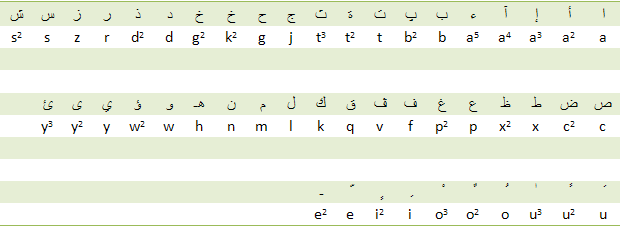
To Shareef @54: Thanks Shareef. You said: "In this English comment box I can not write Arabic words using the above method". Did you press Control-L? That's what you do to toggle between languages. Also, once you highlight a word as bold, italic or underline, the results will show only with you add your comment. We may provide a WYSIWYG editor in the near future. As per your mapping suggestions, you suggested: i) Shift(h) for ? , which is very reasonable, but Key g is unused in Arabic and is to the immediate left of Key h, it is therefore used for ? , see the discussion of Section 7.1. ii) Shift + A for ? and Shift+ AA for ? , but Key a is already used for much more intuitive mappings (alif, its three modified forms and the hamza). True, when transliterating or transcribing ? into English we always depend on one of the vowels to do the work, but that vowel is not necessarily the letter a; for example, how would one transliterate عِبادة , and how about عُبادة ? The first would be something like ibaada, and the second would be something like obaada, right? iii) Shift(t) for ? , please see discussion provided in Section 7.3, where we try to inject some logic behind such an assignment. To Ahmad @58: This is just the beginning, we have lined up i) google search in Intellark typing, ii) online web editor, iii) Arabic-2-English name transcriber, and iv) letter and word frequency analyzer, and these are just the beginning before another round of products. To Abdullah @59: You are right! As indicated in the introduction, Intellark is suitable the most for typists used to QWERTY and no other layout! If you are already familiar with the current Arabic layout and know where every Arabic-generating key is by heart, then you already have an advantage not enjoyed by the millions of us QWERTY typists, until the advent of Intellark that is  . Still, give us a try every now and then. For new learners, Arabic or English, Intellark provides the unchallenged advantage of making you transfer typing knowledge from one language to the other. . Still, give us a try every now and then. For new learners, Arabic or English, Intellark provides the unchallenged advantage of making you transfer typing knowledge from one language to the other.ع ط ح can be better presented...
I like so much and i am thik i will use it alot in the future, cuz i dont have an arabic keyborad.
Just few comments, i think the letters ع ط ح can be better presented. I suggest that ح is will be easier if replaced by clicking h twice or number 7; ع clicking a twice, and ط clicking t twice or number 6.. Great work..... All keys to be sound related
In this English comment box I can not write Arabic words using the above method.
Above Comment Icons....Bold, Italic, Underline did not work for me. Suggestion: Lesser reading of manual and providing tips that could be easily understood by a common person based upon sounds. shift+ H for ح ٍShift + A for ع Shift+ AA for غ Shift+T for ط etc. Good luck responses
Thank you all so far, your comments have helped us greatly in reshaping this tutorial and continue to do so.
To Safa @47: Indeed, among Intellark objectives is to give typists with no Arabic character stickers similar advantages to those who do, yet without cluttering the keys with multilingual stickers. To Noor @48: Been struggling? You bet, that makes ... millions of us typists. Since 2002 I have asked questions and collected surveys about the current methods of typing in Arabic and the main response is ... struggling. I am glad to feel and hear that such a struggle is over. We are working on pleasant editors, online and offline to let you type away as you wish, using the same knowledge you have to type in English to let you freely type in Arabic. To Noor @49: I hear this a lot, since you added your comment this tutorial has been reduced in size by about 25%, and counting . To Tessneem @50: Precisely, the main idea of Intellark is "we don't have to think about it much!" This is known as Knowledge Transfer, and you can't beat it when trying to learn how a new tools operates. To Yara @52: Thank you. In our modest opinion, all type-able letters should remain at the three rows where a touch-typist (TT) feels home (see http://en.wikipedia.org/wiki/Touch_typing); this allows a TT to type to their potential, without removing their hands from the home-position, and without having to travel to the top number row of the keyboard which is seldom memorized even by TTs. Further, for natural writing from a visual perspective, the focus should be on what is currently being typed rather than what typing is going to flip into! Such tools could be suitable for single scattered words, but not for cohesive sentences, emails or essay writing in general. A great tool should not dazzle your eyes by keeping you guess "what's next?", rather, it should completely remain in the shadow while making everything else work for you. Timer? You bet, we are working on that and will provide one soon to control the time among consecutive key-presses. Your comment Yara about the mapping of Keys g, p, and x is true, we therefore did a bit of editing in Section 7 to provide more intuition in such maps, and ended with the statement shown directly above Exercise 8. You should notice also that the first sentence in Exercise 8 lists all those letters in lexicographical order, so all you have to remember is that Key c takes you to ص , and that ص takes to ض , and that since ص and ض are the next letters in order, so is Key x which is next to Key c when going from right to left. That leaves you with one key to learn! Key p. Hey, who said there is such thing as free lunch?  ...
This is just brilliant! I added this to my favourites! It's way better than google/ta3reeb...
really brilliant.. but i have a comment about te (g) (p) (x) '' I already memorized them '' they're a bit confusing for elderly, AT THE START, but theywould ind it really cool afteward.. And, regaring the (A) 5 times' taps. it's a bit fast, if you make it slower so that the typer has the time to decide which (A) they're seeking. one more thing,the (shaddeh) and all that,it adds some further confusion. but would dramatically help. it's really smart and easy to use. I can say i am 85% of a good user of it now . realllly nice
i really liked the idea and the way we can type in arabic using english letters.. it made it much easier typing in arabic.. we don't even have to think about it much since we're used to writing arabic words in english. And its faster since most people don't have the arabic keyboard on their computers memorized..
The tutorial explained everything gr8 but it was kinda too long.. makes ppl skip through it more.. other than that, love it! this would come in handy for most people  keep up the gd work!! |
Help keep Intellaren up and running with more offerings.
Help us build these products:
 Intellark


 Intellark-enabled notepad
 Show/hide comments


 Read more articles
 Watch our videos